> ## Documentation Index
> Fetch the complete documentation index at: https://cubed3-claude-gallant-ramanujan-v3umyw.mintlify.site/llms.txt
> Use this file to discover all available pages before exploring further.
# Administration
> TODO
Cube is configured via [environment variables][link-env-vars] and
[configuration options][link-config] in a configuration file. Usually,
both would be used to configure a Cube deployment in production.
## Environment variables
Environment variables are mostly used for configuration that is defined
statically and is not supposed to change while a Cube deployment is running.
For example, [`CUBEJS_DATASOURCES`](/reference/configuration/environment-variables#cubejs_datasources) defines a list of data sources to connect
to; changing that list would require the deployment to restart.
See the [environment variables reference][link-env-vars] for all supported options.
See [this recipe][ref-env-var-recipe] if you'd like to reference environment variables
in code.
### Cube Core
You can set environment variables in any way [supported by
Docker][link-docker-env-vars], e.g., a `.env` file or the `environment`
option in the `docker-compose.yml` file.
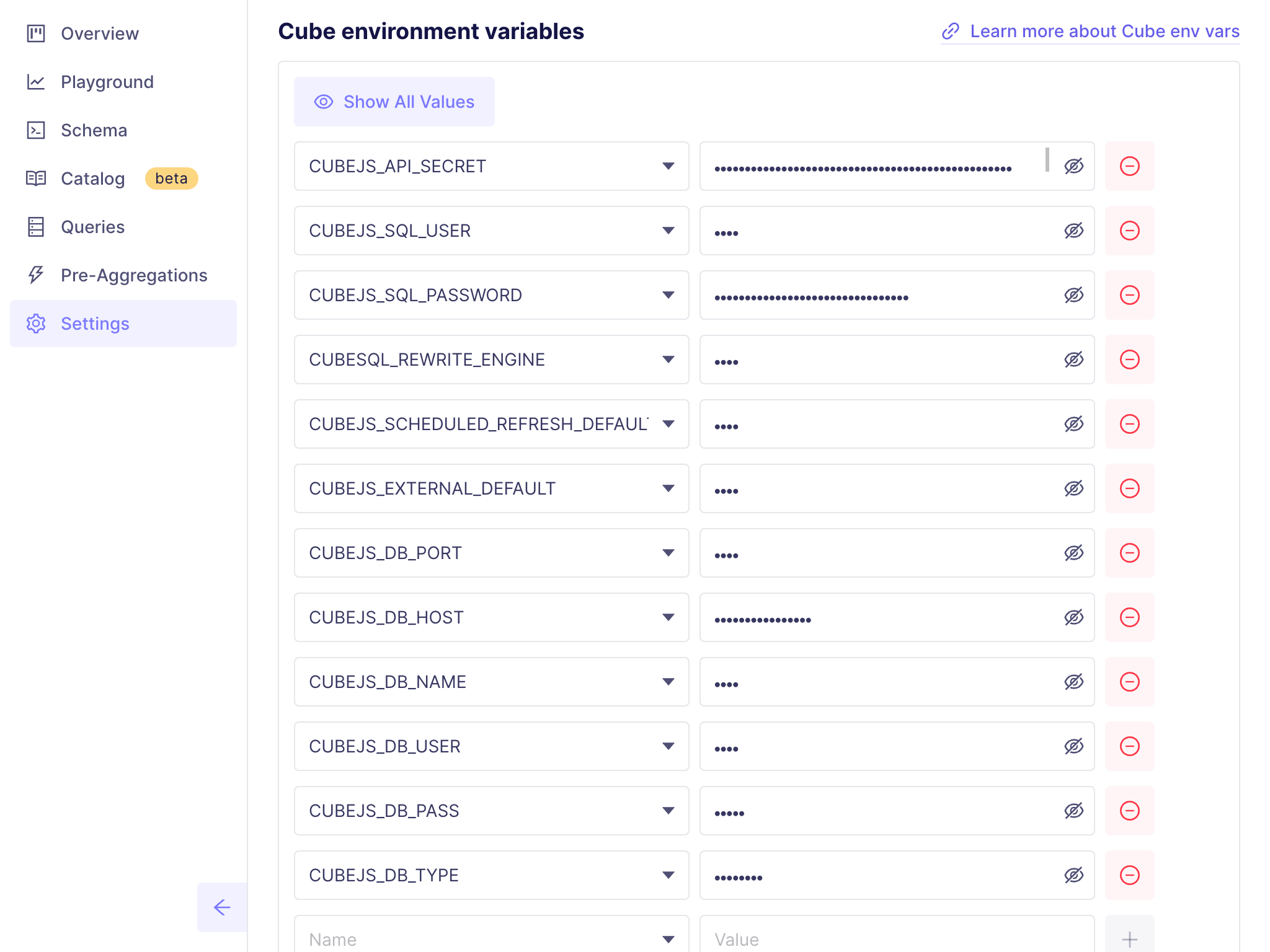
### Cube Cloud
You can set environment variables in **Settings → Configuration**:
 ## Configuration options
Configuration options are mostly used for configuration that is defined
programmatically and applied dynamically while a Cube deployment is running.
For example, [`query_rewrite`](/reference/configuration/config#query_rewrite)
provides a way to inspect, modify, or restrict every query that is being
processed by Cube.
Configuration options take precedence over environment variables.
See the [configuration options reference][link-config] for all supported options.
### `cube.py` and `cube.js` files
Configuration options can be defined either using Python, in a `cube.py` file,
or using JavaScript, in a `cube.js` file in the root folder of a Cube project.
```python title="Python" theme={null}
from cube import config
# Base path for the REST (JSON) API
config.base_path = '/cube-api'
# Inspect, modify, or restrict every query
@config('query_rewrite')
def query_rewrite(query: dict, ctx: dict) -> dict:
if 'order_id' in ctx['securityContext']:
query['filters'].append({
'member': 'orders_view.id',
'operator': 'equals',
'values': [ctx['securityContext']['order_id']]
})
return query
```
```javascript title="JavaScript" theme={null}
module.exports = {
// Base path for the REST (JSON) API
basePath: '/cube-api',
// Inspect, modify, or restrict every query
queryRewrite: (query, { securityContext }) => {
if (securityContext.order_id) {
query.filters.push({
member: 'orders_view.id',
operator: 'equals',
values: [securityContext.order_id]
})
}
return query
}
}
```
Both ways are equivalent; when in doubt, use Python.
Here is a minimal correct `cube.py` file. Note that the [`config`
object][ref-cube-package-config] must be imported:
```python theme={null}
from cube import config
# Configuration goes here...
```
Here is a minimal correct `cube.js` file. Note that the `module.exports` object must be defined:
```javascript theme={null}
module.exports = {
// Configuration goes here...
}
```
You can read more about [Python][ref-python] and [JavaScript][ref-javascript] support
in the dynamic data modeling section of the documentation.
### Cube Core
When using Docker, ensure that the configuration file and your [data model
folder][ref-folder-structure] are mounted to `/cube/conf` within the
Docker container.
### Cube Cloud
You can edit the configuration file by going into **Development Mode**
and navigating to **[Data Model][ref-data-model]** or **[Visual
Modeler][ref-visual-model]** pages.
## Runtimes and dependencies
Cube uses Python and Node.js as runtime environments for the code of
configuration and [dynamic data models][ref-dynamic-data-models]. You can look
current versions up on GitHub: [Python][link-current-python-version],
[Node.js][link-current-nodejs-version].
It's recommended to use `requirements.txt` and `package.json` files to
specify dependencies for your Python and JavaScript code, respectively.
### Cube Core
If you have specified Python packages in the `requirements.txt` file,
make sure to install them by running `pip install -r requirements.txt`
inside the Docker container.
If you have specified npm packages in the `package.json` file, make sure
to install them by running `npm install` inside the Docker container.
Alternatively, you can run `npm install` on your local machine and mount
the `node_modules` folder under `/cube/conf` in the Docker container;
however, if your dependencies contain native extensions, they might not work
when provided this way.
To automate the installation of dependencies, build and use a [custom
Docker image][ref-custom-docker-image].
### Cube Cloud
Cube Cloud automatically installs dependencies from `requirements.txt` and
`package.json` files.
## Development mode
**Development mode is an authentication bypass.** Cube is in development mode when
`CUBEJS_DEV_MODE=true`, and also whenever `NODE_ENV` is not `production`. When Cube
is started through the `cubejs` CLI — which is what the official Docker images run —
setting `CUBEJS_DEV_MODE=true` additionally forces `NODE_ENV=development`, which
switches off JWT verification on the
[REST (JSON)](/reference/core-data-apis/rest-api) and
[GraphQL](/reference/core-data-apis/graphql-api) APIs: they then accept requests with
no token at all.
Development mode also mounts [Playground](/docs/explore-analyze/playground) and its
supporting endpoints with no authentication whatsoever. Anyone who can reach the
instance is handed a ready-to-use API token, and can mint further ones carrying any
security context signed with your API secret — and so query every data API as any user,
bypassing [member-level access
control](/docs/data-modeling/access-control/member-level-security) and [row-level
security](/docs/data-modeling/access-control/row-level-security). The same endpoints
read your data model files and the table schema of every connected data source, and
overwrite your data model and your `.env`. With `CUBEJS_DEV_MODE=true` and no
[`CUBEJS_SQL_PASSWORD`](/reference/configuration/environment-variables#cubejs_sql_password)
set, the SQL API accepts any credentials as well, allowing arbitrary SQL against
connected data sources.
This is intentional. Development mode is designed to run on a developer's local
machine for ease of use and debugging. Never run it where anyone else can reach it,
never expose it to the internet, and never use it in production. Using development
mode in the Cube cloud platform is highly discouraged — it bypasses the platform's
security model.
To keep it off: `cubejs server` and the official Docker images already set
`NODE_ENV=production`, so leaving `CUBEJS_DEV_MODE` unset — its default — is enough
there. If you embed `@cubejs-backend/server-core` directly rather than starting Cube
through the `cubejs` CLI, set `NODE_ENV=production` yourself, since an unset `NODE_ENV`
puts the instance in development mode whatever the flag says.
Cube can be run in an insecure, development mode by setting the
[`CUBEJS_DEV_MODE`](/reference/configuration/environment-variables#cubejs_dev_mode) environment variable to `true`. Putting Cube in development
mode does the following:
* Disables [member-level access control][ref-mls] when listing the data model.
* Enables Cube Store in single instance mode.
* Enables background refresh for in-memory cache and [scheduled
pre-aggregations][link-scheduled-refresh].
* Allows another log level to be set (`trace`).
* Enables [Playground][link-dev-playground] on `http://localhost:4000`.
* Uses `memory` instead of `cubestore` as the default cache/queue engine.
* Logs incorrect/invalid configuration for `externalRefresh` /`waitForRenew`
instead of throwing errors.
[ref-folder-structure]: /docs/data-modeling/concepts/syntax#folder-structure
[link-config]: /reference/configuration/config
[link-dev-playground]: /docs/explore-analyze/playground
[link-env-vars]: /reference/configuration/environment-variables
[link-scheduled-refresh]: /reference/data-modeling/pre-aggregations#scheduled_refresh
[ref-dynamic-data-models]: /docs/data-modeling/dynamic
[ref-custom-docker-image]: /admin/deployment/core#extend-the-docker-image
[link-docker-env-vars]: https://docs.docker.com/compose/environment-variables/set-environment-variables/
[ref-mls]: /docs/data-modeling/access-control/member-level-security
[link-current-python-version]: https://github.com/cube-js/cube/blob/master/packages/cubejs-docker/latest.Dockerfile#L13
[link-current-nodejs-version]: https://github.com/cube-js/cube/blob/master/packages/cubejs-docker/latest.Dockerfile#L1
[ref-data-model]: /docs/data-modeling/data-model-ide
[ref-visual-model]: /docs/data-modeling/visual-modeler
[ref-python]: /docs/data-modeling/dynamic/jinja#python
[ref-javascript]: /docs/data-modeling/dynamic/javascript
[ref-cube-package-config]: /reference/data-modeling/cube-package#config-object
[ref-env-var-recipe]: /recipes/configuration/environment-variables
## Configuration options
Configuration options are mostly used for configuration that is defined
programmatically and applied dynamically while a Cube deployment is running.
For example, [`query_rewrite`](/reference/configuration/config#query_rewrite)
provides a way to inspect, modify, or restrict every query that is being
processed by Cube.
Configuration options take precedence over environment variables.
See the [configuration options reference][link-config] for all supported options.
### `cube.py` and `cube.js` files
Configuration options can be defined either using Python, in a `cube.py` file,
or using JavaScript, in a `cube.js` file in the root folder of a Cube project.
```python title="Python" theme={null}
from cube import config
# Base path for the REST (JSON) API
config.base_path = '/cube-api'
# Inspect, modify, or restrict every query
@config('query_rewrite')
def query_rewrite(query: dict, ctx: dict) -> dict:
if 'order_id' in ctx['securityContext']:
query['filters'].append({
'member': 'orders_view.id',
'operator': 'equals',
'values': [ctx['securityContext']['order_id']]
})
return query
```
```javascript title="JavaScript" theme={null}
module.exports = {
// Base path for the REST (JSON) API
basePath: '/cube-api',
// Inspect, modify, or restrict every query
queryRewrite: (query, { securityContext }) => {
if (securityContext.order_id) {
query.filters.push({
member: 'orders_view.id',
operator: 'equals',
values: [securityContext.order_id]
})
}
return query
}
}
```
Both ways are equivalent; when in doubt, use Python.
Here is a minimal correct `cube.py` file. Note that the [`config`
object][ref-cube-package-config] must be imported:
```python theme={null}
from cube import config
# Configuration goes here...
```
Here is a minimal correct `cube.js` file. Note that the `module.exports` object must be defined:
```javascript theme={null}
module.exports = {
// Configuration goes here...
}
```
You can read more about [Python][ref-python] and [JavaScript][ref-javascript] support
in the dynamic data modeling section of the documentation.
### Cube Core
When using Docker, ensure that the configuration file and your [data model
folder][ref-folder-structure] are mounted to `/cube/conf` within the
Docker container.
### Cube Cloud
You can edit the configuration file by going into **Development Mode**
and navigating to **[Data Model][ref-data-model]** or **[Visual
Modeler][ref-visual-model]** pages.
## Runtimes and dependencies
Cube uses Python and Node.js as runtime environments for the code of
configuration and [dynamic data models][ref-dynamic-data-models]. You can look
current versions up on GitHub: [Python][link-current-python-version],
[Node.js][link-current-nodejs-version].
It's recommended to use `requirements.txt` and `package.json` files to
specify dependencies for your Python and JavaScript code, respectively.
### Cube Core
If you have specified Python packages in the `requirements.txt` file,
make sure to install them by running `pip install -r requirements.txt`
inside the Docker container.
If you have specified npm packages in the `package.json` file, make sure
to install them by running `npm install` inside the Docker container.
Alternatively, you can run `npm install` on your local machine and mount
the `node_modules` folder under `/cube/conf` in the Docker container;
however, if your dependencies contain native extensions, they might not work
when provided this way.
To automate the installation of dependencies, build and use a [custom
Docker image][ref-custom-docker-image].
### Cube Cloud
Cube Cloud automatically installs dependencies from `requirements.txt` and
`package.json` files.
## Development mode
**Development mode is an authentication bypass.** Cube is in development mode when
`CUBEJS_DEV_MODE=true`, and also whenever `NODE_ENV` is not `production`. When Cube
is started through the `cubejs` CLI — which is what the official Docker images run —
setting `CUBEJS_DEV_MODE=true` additionally forces `NODE_ENV=development`, which
switches off JWT verification on the
[REST (JSON)](/reference/core-data-apis/rest-api) and
[GraphQL](/reference/core-data-apis/graphql-api) APIs: they then accept requests with
no token at all.
Development mode also mounts [Playground](/docs/explore-analyze/playground) and its
supporting endpoints with no authentication whatsoever. Anyone who can reach the
instance is handed a ready-to-use API token, and can mint further ones carrying any
security context signed with your API secret — and so query every data API as any user,
bypassing [member-level access
control](/docs/data-modeling/access-control/member-level-security) and [row-level
security](/docs/data-modeling/access-control/row-level-security). The same endpoints
read your data model files and the table schema of every connected data source, and
overwrite your data model and your `.env`. With `CUBEJS_DEV_MODE=true` and no
[`CUBEJS_SQL_PASSWORD`](/reference/configuration/environment-variables#cubejs_sql_password)
set, the SQL API accepts any credentials as well, allowing arbitrary SQL against
connected data sources.
This is intentional. Development mode is designed to run on a developer's local
machine for ease of use and debugging. Never run it where anyone else can reach it,
never expose it to the internet, and never use it in production. Using development
mode in the Cube cloud platform is highly discouraged — it bypasses the platform's
security model.
To keep it off: `cubejs server` and the official Docker images already set
`NODE_ENV=production`, so leaving `CUBEJS_DEV_MODE` unset — its default — is enough
there. If you embed `@cubejs-backend/server-core` directly rather than starting Cube
through the `cubejs` CLI, set `NODE_ENV=production` yourself, since an unset `NODE_ENV`
puts the instance in development mode whatever the flag says.
Cube can be run in an insecure, development mode by setting the
[`CUBEJS_DEV_MODE`](/reference/configuration/environment-variables#cubejs_dev_mode) environment variable to `true`. Putting Cube in development
mode does the following:
* Disables [member-level access control][ref-mls] when listing the data model.
* Enables Cube Store in single instance mode.
* Enables background refresh for in-memory cache and [scheduled
pre-aggregations][link-scheduled-refresh].
* Allows another log level to be set (`trace`).
* Enables [Playground][link-dev-playground] on `http://localhost:4000`.
* Uses `memory` instead of `cubestore` as the default cache/queue engine.
* Logs incorrect/invalid configuration for `externalRefresh` /`waitForRenew`
instead of throwing errors.
[ref-folder-structure]: /docs/data-modeling/concepts/syntax#folder-structure
[link-config]: /reference/configuration/config
[link-dev-playground]: /docs/explore-analyze/playground
[link-env-vars]: /reference/configuration/environment-variables
[link-scheduled-refresh]: /reference/data-modeling/pre-aggregations#scheduled_refresh
[ref-dynamic-data-models]: /docs/data-modeling/dynamic
[ref-custom-docker-image]: /admin/deployment/core#extend-the-docker-image
[link-docker-env-vars]: https://docs.docker.com/compose/environment-variables/set-environment-variables/
[ref-mls]: /docs/data-modeling/access-control/member-level-security
[link-current-python-version]: https://github.com/cube-js/cube/blob/master/packages/cubejs-docker/latest.Dockerfile#L13
[link-current-nodejs-version]: https://github.com/cube-js/cube/blob/master/packages/cubejs-docker/latest.Dockerfile#L1
[ref-data-model]: /docs/data-modeling/data-model-ide
[ref-visual-model]: /docs/data-modeling/visual-modeler
[ref-python]: /docs/data-modeling/dynamic/jinja#python
[ref-javascript]: /docs/data-modeling/dynamic/javascript
[ref-cube-package-config]: /reference/data-modeling/cube-package#config-object
[ref-env-var-recipe]: /recipes/configuration/environment-variables